

You're standing at the smog station counter with a fresh Vehicle Inspection Report in your hand. The page is full of abbreviations, check marks, “incomplete” statuses, and one prominent word at the top: PASS or FAIL. If your result says fail, it's easy to assume the car needs an expensive repair, even when the report is pointing to a timing problem after recent battery work.
Learning how to read smog check results starts with reading the page in the right order. Begin with the verdict, then identify the failure category, check readiness, review fault information, and finally look at visual or functional findings. That sequence usually tells you whether you need a mechanic, more normal driving, or no action at all.
Table of Contents
- Why Your Smog Check Printout Matters
- Understanding the Vehicle Inspection Report Layout
- Reading Readiness Monitors on Your OBD Report
- Decoding OBD Trouble Codes and Emission Readings
- Repair Problem or Timing Problem
- Your Next Steps After a Failed Smog Check
- Smog Check Tips and Key Takeaways
Why Your Smog Check Printout Matters
A Vehicle Inspection Report is more useful than the large PASS or FAIL line suggests. California's Bureau of Automotive Repair says the report includes the test results, the overall pass or fail outcome, and any open safety recalls identified through the inspection process. California BAR's Smog Check guidance also shows why this audience needs clearer explanations: about 1.3 million of 19 million 2000+ model-year vehicles tested in calendar years 2024 and 2025 failed Smog Check.
That failure number doesn't mean every driver has a major engine problem. A failed report can reflect an active emissions fault, incomplete computer self-tests, a visual issue, a functional problem, or an emissions reading above the applicable limit. Those categories lead to very different next steps.
Practical rule: Don't diagnose the car from the PASS or FAIL line alone. Find the specific category that produced the result.
Start at the top and confirm that the report belongs to your vehicle. Check the vehicle identification details, including the information used by the station to record the inspection. Then locate the overall result. Treat that line as the answer to “Did the vehicle pass today?” It doesn't necessarily answer “What should I do next?”
The reason usually appears lower on the page. You may see OBD fault information, readiness monitor statuses, visual inspection results, functional checks, or emission measurements. Read those lines as evidence. A report marked FAIL because a monitor is incomplete calls for a different response than one showing an active fault code or a failed emissions component.
That distinction is the foundation of a calm, accurate conversation at the counter. You don't need to understand every abbreviation before you can understand the decision the report is asking you to make.
Understanding the Vehicle Inspection Report Layout
Think of the report as a series of questions about the vehicle. Each block answers one question, and the order matters.
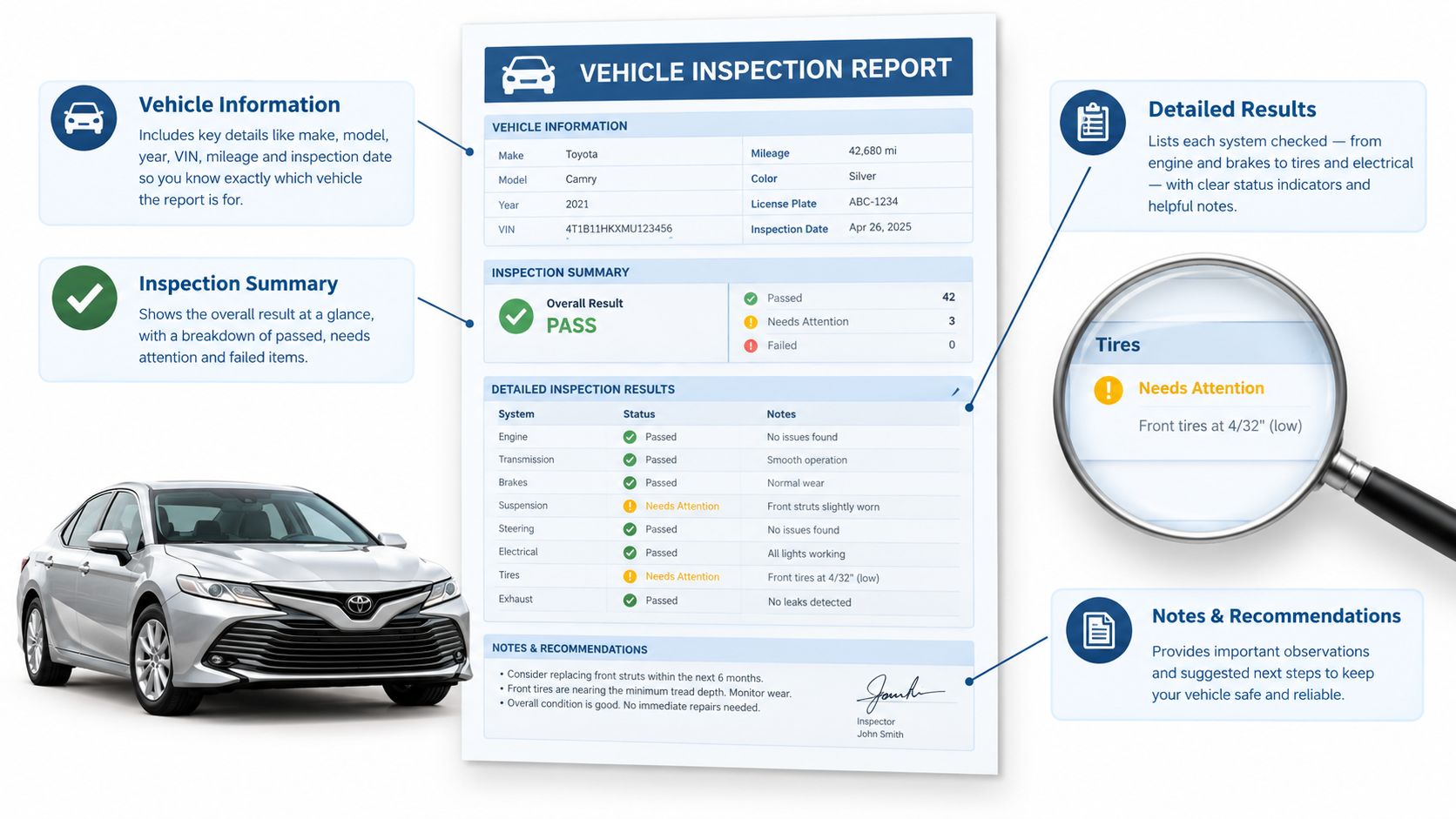
Start with the identity and verdict
The vehicle information block confirms that the station tested the correct car. Check the identifying details before you interpret anything else. Next, find the overall result line. PASS means the vehicle met the requirements recorded by that inspection. FAIL means at least one part of the inspection did not meet the requirements.
The verdict is important, but it's only the first layer. Don't jump from FAIL straight to “replace a part.” Move down the report and find the marked failure category.
Find the reason hierarchy
The report may separate results into several groups:
- OBD fault information: This shows whether the onboard diagnostic system reported emissions-related trouble codes or a malfunction indicator lamp condition.
- Readiness status: This shows whether the vehicle's emissions self-tests have completed.
- Visual inspection: This records whether required emissions equipment appears present and compliant.
- Functional inspection: This checks whether certain emissions-related systems operate as required.
- Emission measurements: On vehicles and tests where measurements apply, this section compares measured pollutants with the applicable limits.
A report can contain more than one concern. For example, it might show incomplete readiness alongside a visual or functional issue. Don't assume the first line you notice is the only reason for failure. Look for the section that is explicitly marked failed, then note whether another section contains a separate issue that also needs attention.
Treat recalls as separate information
Open safety recalls may appear on the report, but a recall notice isn't automatically the same thing as an emissions failure. Keep it in view, then separate it from the result category that caused the smog outcome. This prevents a reader from confusing a safety notice with a failed OBD or emissions test.
The most useful question to ask the technician is specific: “Which report line caused the failure?” Once you know whether the answer is readiness, OBD, visual, functional, or emissions measurement, the rest of the printout becomes much easier to interpret.
Reading Readiness Monitors on Your OBD Report
A readiness monitor is a self-test performed by the vehicle's onboard computer. The computer checks emissions-related systems during different driving conditions, then records whether each test is complete. The monitor doesn't just tell you whether a part exists. It tells you whether the vehicle has completed the conditions needed to evaluate that system.
On the report, look for a readiness section with statuses such as complete, ready, incomplete, or not ready. The exact labels can vary, but the meaning is straightforward. A complete monitor has finished its self-check. An incomplete monitor hasn't finished, so the computer doesn't yet have a completed result for that system.
Why monitors become incomplete
The most common timing clue is recent interruption of the vehicle's computer memory. Clearing a trouble code or disconnecting the battery can reset readiness information. The check-engine light may be off afterward, but the vehicle still needs normal driving conditions to run its self-tests again.
That's why a car can feel completely normal and still fail the inspection. The driver may not notice any change in acceleration, starting, or fuel use, while the computer reports that one or more required checks remain unfinished. The problem is the missing data, not necessarily a failed mechanical component.
California BAR explains that a vehicle fails when too many readiness monitors are incomplete. The agency says owners can often address a readiness-related failure by driving normally for about a week so the monitors can reset, and as of October 1, 2025, California requires all readiness monitors to be set for a pass. California's OBD II readiness guidance makes this screen a first-pass diagnostic step, not a minor footnote.
What to do with the screen
If the report shows incomplete monitors but no active fault information, don't clear the system again. That would restart the same process. Drive the vehicle normally, including the types of city and highway conditions it ordinarily experiences, then have the readiness status checked again.
For a more detailed explanation of the statuses and what they indicate, review this guide to OBD readiness monitors. The key question remains simple: are the monitors incomplete because the car needs time to finish its self-tests, or are they incomplete because an underlying fault keeps preventing completion?
Decoding OBD Trouble Codes and Emission Readings
Once readiness is clear, read the OBD fault information. OBD stands for onboard diagnostics, the vehicle's computer system for monitoring emissions-related operation. A diagnostic trouble code, often called a DTC, is the computer's standardized description of a detected problem.
Codes commonly begin with a letter. P generally identifies a powertrain-related code, which can involve the engine, transmission, or emissions controls. The numbers that follow narrow the system and condition involved. You don't need a complete code encyclopedia at the counter. You need to record the exact code and connect it to the failure category printed on the report.
Common fault clues
California BAR notes that a vehicle with the check-engine light on won't pass, and that modified or non-approved software can also cause failure. The 2026 California Smog Check Performance Report identifies several familiar sources of OBD emissions failures, including loose gas caps, oxygen-sensor faults, and evaporative leaks.
Those clues point to different diagnostic paths:
- Loose or damaged gas cap: The fuel-vapor system may not seal correctly, allowing an evaporative emissions fault to appear.
- Evaporative leak: The system that stores and controls fuel vapors may have a leak or another sealing problem.
- Oxygen-sensor fault: The computer may be receiving an unreliable signal used to manage fuel and emissions control.
- Modified software: Non-approved programming can cause the vehicle to fail even if the car drives normally.
The report may also show emission measurements rather than, or in addition to, OBD information. A measurement above the applicable limit indicates that the vehicle's recorded emissions exceeded the standard used for that inspection. That result needs diagnosis, not a guess based on how the exhaust smells or how smoothly the engine runs.
Don't rely on driving feel
A vehicle can fail with no obvious drivability symptoms. The onboard computer may detect an emissions-control problem before the driver notices rough running, hesitation, or reduced power. The code and the report are the evidence to use when deciding what to inspect.
Write down every code exactly as shown. Don't replace a sensor just because its name appears in a code. A code identifies a detected condition, but proper diagnosis determines whether the sensor, wiring, leak, software, or another component caused it. You can also review this explanation of emissions test results before approving repairs.
Repair Problem or Timing Problem
The most useful distinction on a failed report is whether the computer is reporting an active fault or an unfinished self-test. An active fault usually requires diagnosis and repair. An incomplete readiness result may require more normal driving, provided the report doesn't also show a fault, lamp, visual issue, or failed measurement.
| What the Report Shows | Likely Problem Type | Your Next Move |
|---|---|---|
| Check-engine light is on | Active emissions or engine-management fault | Have the code diagnosed and repair the underlying cause |
| Specific OBD trouble code is listed | Active fault information | Record the code and seek diagnosis before retesting |
| No active code, but monitors are incomplete | Timing or readiness issue | Avoid clearing the system and drive normally for about a week |
| Emission measurement exceeds the applicable limit | Measured emissions problem | Have the engine and emissions controls diagnosed |
| Visual inspection is marked failed | Equipment or modification issue | Correct the visible emissions-system problem |
| Functional inspection is marked failed | Emissions-related system didn't operate as required | Identify the failed system and repair or service it |
The report can include diagnostic trouble codes, monitor status, or emission measurements that help separate these situations. State inspection guidance also illustrates why paperwork may identify an active fault, an incomplete monitor, or an excessive reading even when the vehicle has no obvious symptoms. This explanation of emissions inspection results is useful for understanding the general logic behind those report fields.
A practical example makes the difference clear. Suppose the check-engine light is off, no trouble code is listed, and the readiness block shows incomplete monitors after recent battery work. That pattern points first toward a timing issue. Suppose instead the light is on and the report lists an evaporative-system code. The car may still drive smoothly, but the report points toward diagnosis and repair.
The safest approach is to match the next action to the strongest clue. Incomplete without an active fault suggests time and driving. A lamp, code, failed measurement, visual issue, or functional issue suggests diagnosis.
Your Next Steps After a Failed Smog Check
Put the report on a clean surface and follow the marked findings instead of guessing. Your next move should come from the reason category.
Check readiness first. If the report shows incomplete monitors without an active code, don't clear the vehicle's memory again. California BAR says normal driving for about a week can allow the monitors to complete, so arrange a readiness check after that period.
Address active faults. If the report shows a check-engine light, diagnostic trouble code, failed emission measurement, visual issue, or functional failure, take the report to a qualified repair professional. Ask for diagnosis of the listed condition rather than an automatic replacement of the named sensor or component.
Keep the paperwork. Bring the original Vehicle Inspection Report or the station's retest information when you return. If you're handling registration renewal, keep the smog paperwork with your DMV documents so the certification and renewal tasks stay connected.
Confirm retest terms. Retest policies vary by station. A test-only station in Antioch offers a free retest under its coupon and site policy, conducts smog testing seven days a week, and doesn't sell repairs. Verify the current terms before you go.
For a plain-language review of the categories that commonly appear after a failure, see this guide to smog check fail reasons. It can help you translate the marked line before you decide whether to drive, repair, or schedule a retest.
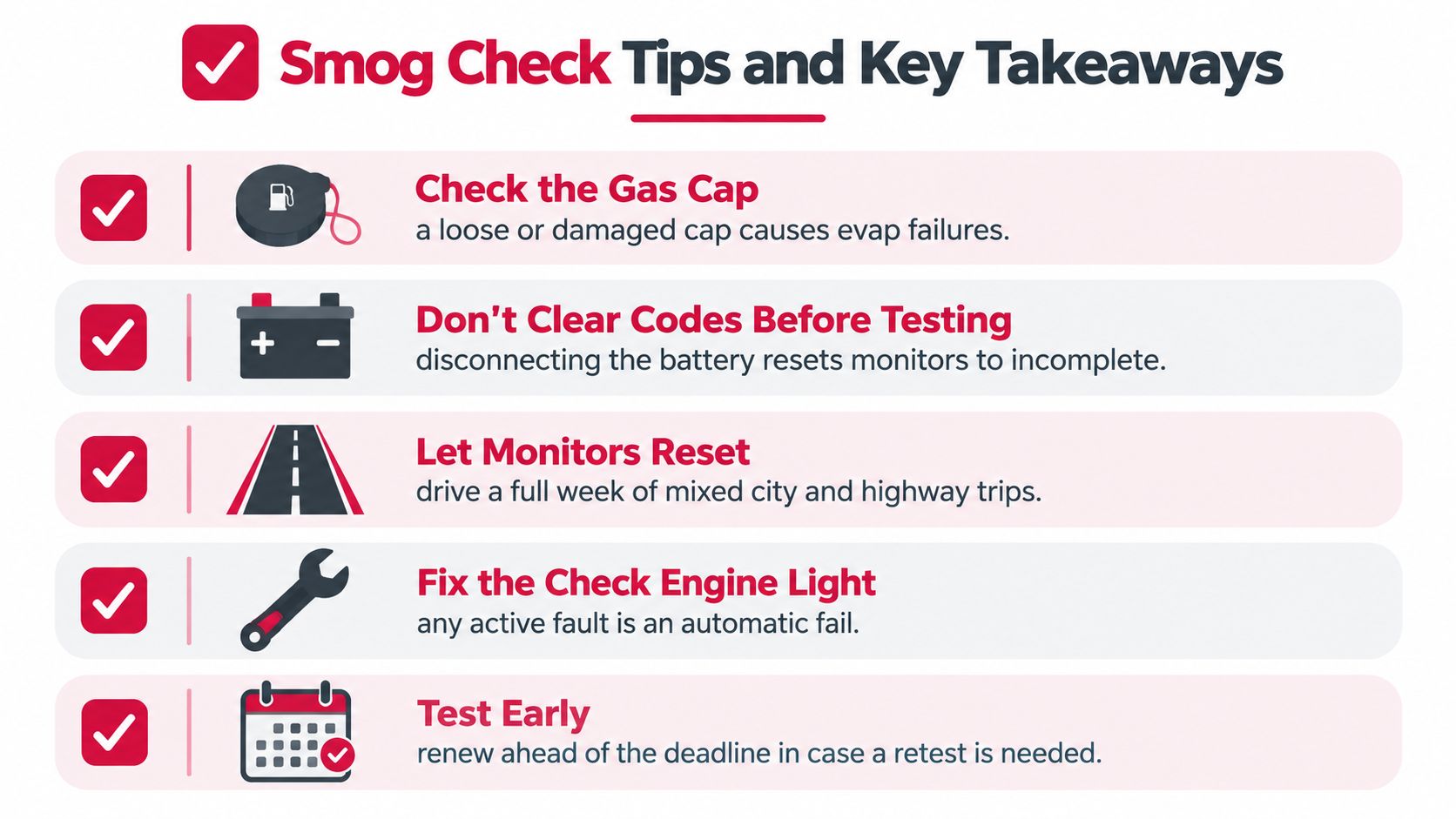
Smog Check Tips and Key Takeaways
Use this short checklist before your next inspection:
- Check the gas cap: Make sure it seals correctly, since a loose cap can contribute to an evaporative-system failure.
- Don't clear codes before testing: Clearing codes or disconnecting the battery can leave readiness monitors incomplete.
- Let the monitors finish: If the report identifies a readiness issue without an active fault, drive normally for about a week before checking again.
- Watch the check-engine light: A lit malfunction indicator lamp is a direct warning that the vehicle may fail.
- Read the reason, not just the verdict: The failure category tells you whether to investigate timing, repairs, measurements, or equipment.
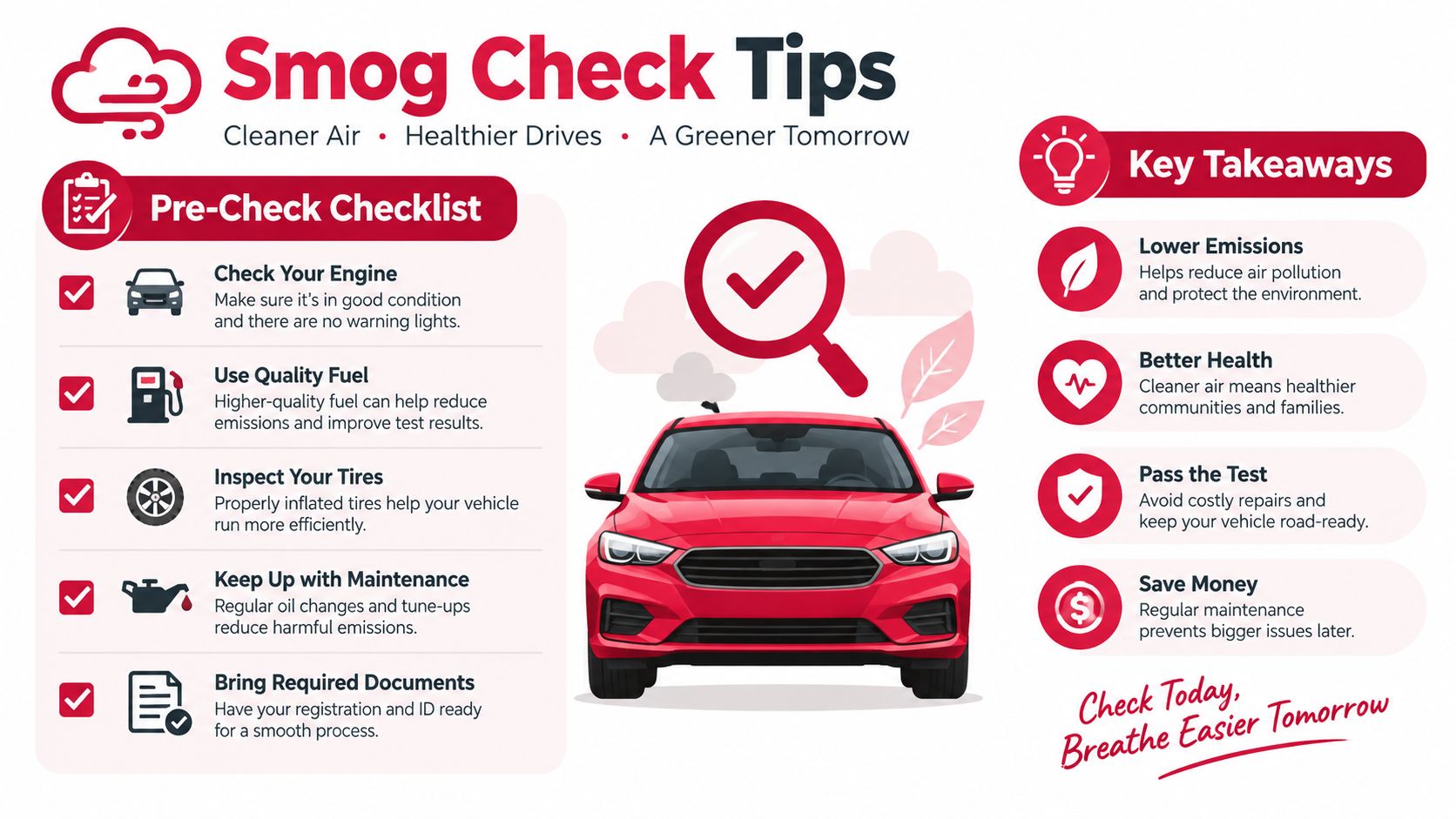
Keep this reading order: Verdict, failure category, readiness status, OBD fault information, then visual, functional, and emission findings.
Most confusion disappears once each line answers one question. The verdict tells you what happened, readiness tells you whether the computer finished checking, fault information points to active conditions, and the failure category tells you what to do next.
If you're in Antioch or East Contra Costa County, Fire House Smog provides STAR-certified test-only inspections, California DMV registration services with on-site tag issuance, and retesting under its current coupon and site policy. Bring your Vehicle Inspection Report, and contact the station before visiting to confirm current hours and retest terms.
You arrive at the smog station with no warning lights, no rough idle, and no obvious performance problem. Then the technician connects a scan tool and tells you the car can't be tested because one or more OBD readiness monitors are incomplete. It feels like a failure even though nobody has found a broken part.
Usually, the issue is that the vehicle's computer hasn't finished checking itself. A battery disconnect, cleared diagnostic codes, recent repair, or driving routine made up mostly of short trips can leave those tests unfinished. California's requirements make this especially important because the state is moving toward a pass standard that requires every applicable monitor to be set.
Table of Contents
- Why Your Car Was Turned Away at the Smog Test
- What OBD Readiness Monitors Do
- California Smog Check Requirements for Readiness Monitors
- How to Check Monitor Status with an OBD-II Scanner
- Common Reasons Monitors Show Not Ready
- Drive Cycles That Set Stubborn Monitors
- Your Pre-Smog Checklist and When to Visit a STAR Station
Why Your Car Was Turned Away at the Smog Test
The technician didn't turn you away because the car looked unsafe or because the engine sounded bad. The station connected to the vehicle's OBD II system and found that its emissions self-tests hadn't completed. Federal OBD inspection rules recognize an unset readiness flag as evidence that the vehicle isn't ready for a complete emissions evaluation, not automatic proof that an emissions component has failed. The EPA's description of OBD inspection rules explains why a vehicle with unset readiness flags may be rejected from further testing.
Your car's computer needs to verify that systems such as the catalytic converter, oxygen sensors, fuel system, and evaporative controls are working within expected limits. Some checks happen during ordinary operation. Others require a particular combination of engine temperature, speed, load, fuel level, and time. If those conditions haven't occurred, the computer can't mark the test complete.
Why a healthy-feeling car can still be unready
A recent repair may have solved the original problem but erased the computer's stored testing history. Disconnecting the battery can do the same thing. Clearing a diagnostic trouble code with a scanner may switch several monitors back to Not Ready, even if the check engine light stays off while the vehicle begins a new round of testing.
That creates the frustrating sequence many owners experience:
- The repair is completed: The suspected fault may be fixed.
- The memory is cleared: The vehicle loses its completed monitor records.
- The car is driven too casually: Short trips may not provide the conditions needed for every test.
- The inspection comes too soon: The station sees incomplete monitors and can't complete the emissions evaluation.
A useful explanation of related smog check fail reasons can help you separate an incomplete-monitor rejection from a true emissions fault. The next step isn't guessing or repeatedly clearing codes. It's finding out which monitors are incomplete, then giving the vehicle the conditions it needs to run them.
Practical rule: An illuminated check engine light points to a fault. An incomplete readiness monitor points to an unfinished self-test. They're related, but they aren't the same diagnosis.
What OBD Readiness Monitors Do
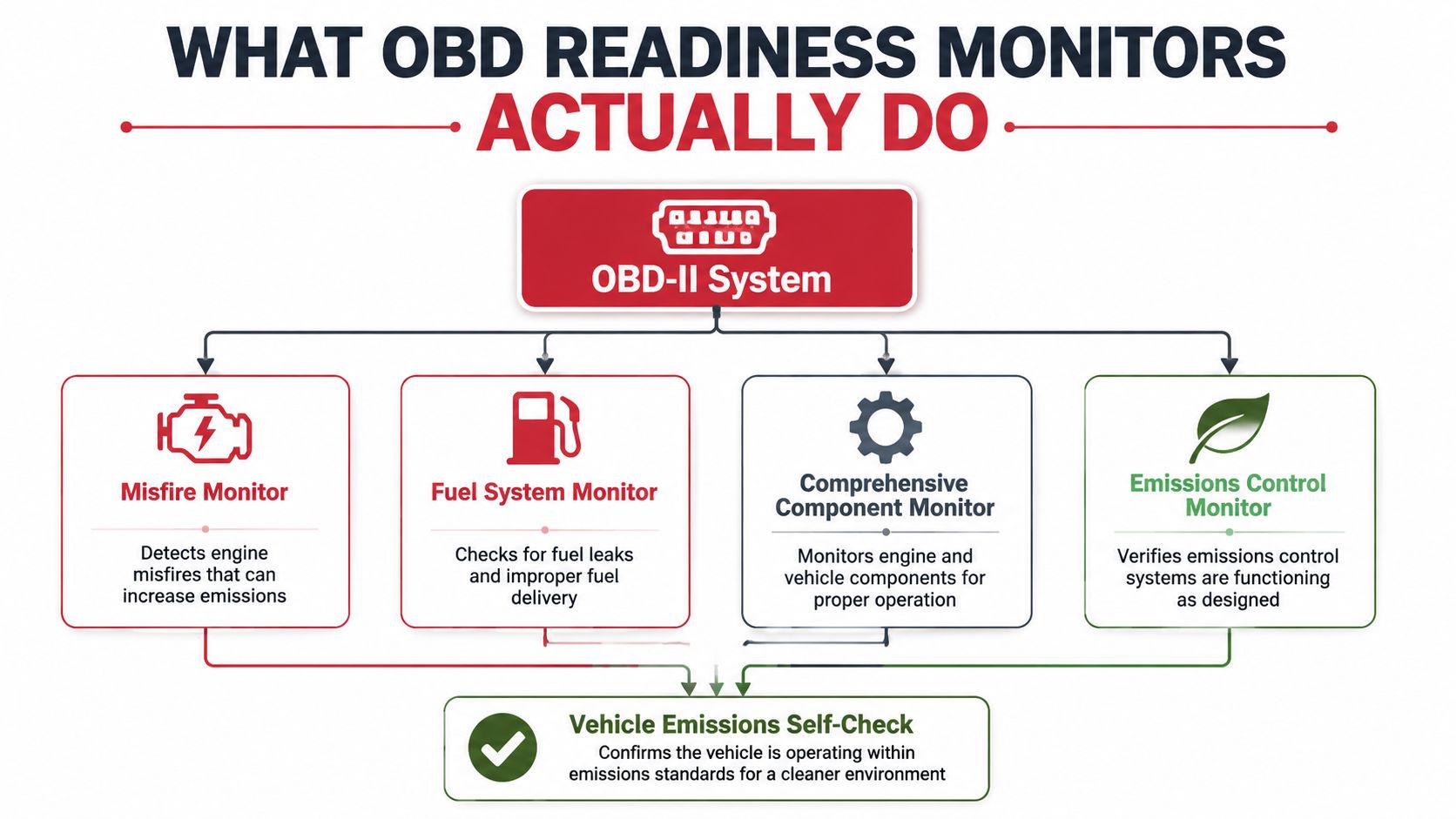
After a repair or battery disconnect, your vehicle may start with several emissions tests unfinished. The OBD-II system works like an onboard checklist. Each readiness monitor runs a specific self-test when the right operating conditions occur. If the result meets the programmed standard, the computer records the monitor as Ready or Complete.
These monitors judge system behavior while the engine operates. The catalyst monitor uses sensor data to assess catalytic-converter performance. The oxygen-sensor monitor checks whether the sensors and related circuits respond as expected. The evaporative system monitor looks for conditions linked to fuel-vapor control and leak detection.
The checklist runs under specific conditions
Some monitors are continuous. The vehicle can evaluate misfire, fuel-system, and component operation during much of normal driving. Other monitors are non-continuous and need a particular sequence, such as a cold start followed by warm operation, steady cruising, or deceleration.
A short trip around the block may provide none of those conditions. The engine might already be warm, the vehicle might not maintain the needed speed, or traffic might interrupt the sequence. This mismatch explains many failures after a repair. The owner drives regularly, but the vehicle's testing logic is waiting for a narrower pattern.
What each status means
- Ready or Complete: The computer finished that applicable test and stored its result.
- Not Ready or Incomplete: The test has not finished. This status does not prove a part is defective, but it can prevent the inspection from proceeding under California's applicable requirements.
- Not Supported: The vehicle does not use that monitor for its engine or emissions configuration. An unsupported monitor generally does not create a problem because it is not an applicable test.
California's Bureau of Automotive Repair describes readiness monitors as OBD self-tests that verify emissions-control functionality. The practical distinction is between applicable and supported monitors. You do not need to force a test the vehicle was never designed to run. You need to complete every monitor that applies to that vehicle, particularly under California's stricter October 2025 completion requirement.
California Smog Check Requirements for Readiness Monitors
California readiness rules have changed from a limited-allowance model toward a much stricter completion standard. The state's Bureau of Automotive Repair reported that updated standards for 2007 and newer light-duty diesel vehicles took effect on July 5, 2023, narrowing which diesel monitors could remain unset. BAR also announced that, effective October 1, 2025, all readiness monitors must be set for a vehicle to pass a Smog Check inspection. These requirements are described in BAR's explanation of the new OBD readiness monitor regulations.
The practical impact is significant. Under the earlier framework, some vehicle categories could pass with a limited number of unset monitors, depending on fuel type and model year. The newer direction treats monitor completion as a hard eligibility condition, while BAR recognizes that unusual vehicle designs may require review or an exception.
Which systems the computer may test
The OBD system can include monitors for:
- Misfire
- Fuel system
- Components
- Catalyst
- Evaporative emissions
- Oxygen sensor
- Oxygen-sensor heater
- Diesel particulate filter
- Non-Methane Hydrocarbon catalyst
- NOx and SCR aftertreatment systems on applicable diesel vehicles
The EPA's diesel OBD guidance describes 11 readiness-monitor bits in both gasoline and diesel OBD systems, with diesel vehicles receiving additional assignments for aftertreatment equipment. Your scanner may show fewer named monitors if some aren't supported by your vehicle.
| Requirement | Current Rule | October 2025 Rule |
|---|---|---|
| Applicable readiness monitors | Pass criteria can vary by fuel type and model year, with limited allowances in some categories | All monitors that can feasibly be set must be complete for a pass, subject to applicable exceptions |
| Gasoline vehicles | Earlier standards differed by model year and could permit a limited unset monitor allowance | Completion becomes the central pass condition |
| Diesel vehicles | Diesel standards can be stricter and use diesel-specific monitor categories | All applicable monitors must be set under the updated standard |
| Unique vehicle designs | Some vehicles may have difficulty completing a monitor through ordinary operation | BAR and CARB may address qualifying design-related difficulties |
Don't assume that every vehicle follows the same threshold. Model year, fuel type, engine configuration, and monitor support matter. California also evaluates hybrid systems according to the monitors supported by their particular OBD configuration, so a hybrid owner should check the vehicle-specific status rather than rely on a gasoline-car rule of thumb.
How to Check Monitor Status with an OBD-II Scanner
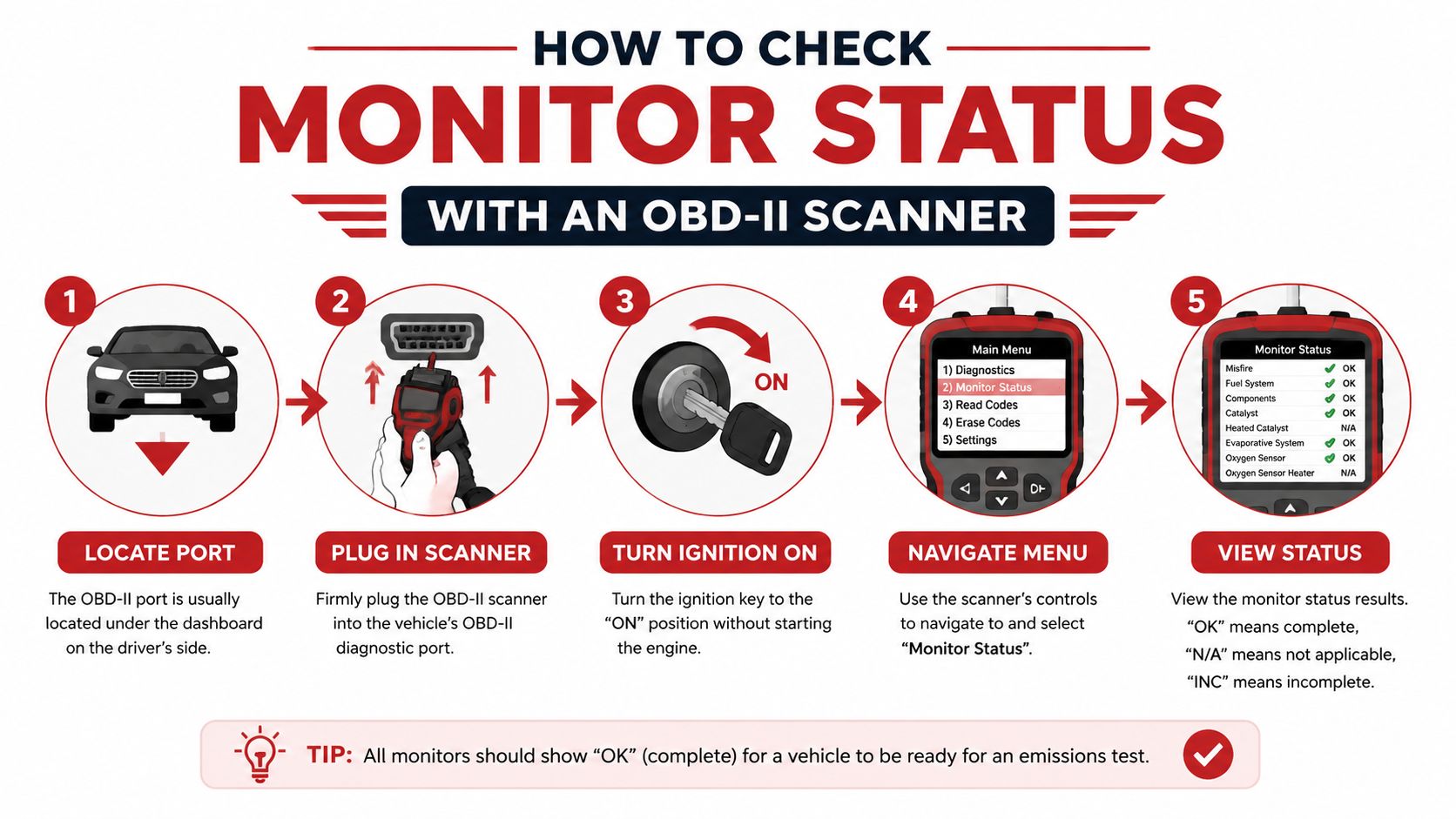
You don't need to wait for the smog station to discover the problem. A scan tool with an I/M readiness function can show whether each applicable monitor is Ready, Not Ready, or Not Supported.
The diagnostic connector is usually under the driver's side dashboard, near the steering column. Plug the scanner into the port with the ignition off, then turn the ignition on without starting the engine unless the tool instructs you otherwise. Select the emissions, I/M readiness, or monitor-status menu.
Read the screen before you clear anything
A basic code reader with readiness functionality is enough for this specific check. Some Bluetooth adapters paired with apps such as Torque or Carista can also display readiness information from the driver's seat. The exact menu names vary, but the meaning of the results remains straightforward.
- Ready: That monitor completed its self-test.
- Not Ready: The vehicle hasn't met the conditions needed to finish it, or a fault is preventing completion.
- Not Supported: That monitor doesn't apply to the vehicle.
Write down the results before taking further action. If the scanner shows a stored or pending fault, don't erase it just to turn off the light. Clearing the code also removes useful diagnostic information and can reset completed monitors. A check engine light and smog check guide can help you understand why an apparently resolved warning may still affect inspection readiness.
What to do with the results
If only a monitor is incomplete and no active fault is present, the next step is usually a suitable drive cycle. If the same monitor stays incomplete after appropriate driving, or the check engine light returns, the vehicle needs diagnosis rather than more random mileage.
Before visiting the station, scan the car again. That simple check can prevent an unnecessary appointment when the computer still shows an unfinished test.
Common Reasons Monitors Show Not Ready
Most incomplete-monitor problems come from a mismatch between how the vehicle performs its tests and how the owner drives. The car may spend its life on short errands, stop-and-go streets, or repeated cold starts. Those trips keep the vehicle moving, but they may never create the stable conditions required for a non-continuous monitor.
Power loss and code clearing
A disconnected battery removes power from the control module and can erase monitor history. Clearing diagnostic trouble codes with a scan tool has a similar effect. In both situations, the computer starts over and waits for the applicable self-tests to run again.
This is why clearing a check engine code immediately before a smog appointment often creates a new problem. The warning may disappear temporarily, but the inspection computer can still see that the readiness record is incomplete.
The absence of a warning light doesn't automatically mean the vehicle is ready for inspection.
Driving patterns can block the test
A monitor may need a cold start, a gradual warm-up, steady cruising, specific deceleration, or a period of undisturbed parking. Heavy traffic can interrupt the sequence. A vehicle that only makes brief trips may never complete a catalyst or evaporative-system test, even though it's driven every day.
Fuel level can also matter for evaporative testing. If the tank is nearly empty or nearly full, the computer may postpone that test because the vapor-space conditions aren't suitable.
Faults and vehicle-specific behavior
A pending fault can prevent a monitor from completing normally. A stored emissions code may also indicate that the computer has detected a problem that requires repair before the monitor can produce a passing result.
Some vehicles are more particular about the order and conditions of their tests. The catalyst and EVAP monitors are common sources of frustration because they may require a carefully timed sequence rather than general driving. If one monitor repeatedly refuses to set, use manufacturer service information or have a technician check for a system fault instead of assuming the scanner is wrong.
Drive Cycles That Set Stubborn Monitors
There isn't one universal drive cycle that works for every make and model. The manufacturer controls the conditions and logic used by the vehicle's computer, so the owner's manual or service information should take priority. A practical routine can still help you create the types of conditions many monitors need.
Start with the vehicle's temperature
Begin with the engine fully cold when the manufacturer's procedure calls for a cold start. Let the vehicle start normally, then drive gently through a mixture of streets and open-road conditions. Avoid aggressive acceleration, unnecessary idling, and stopping the engine before the sequence has a chance to develop.
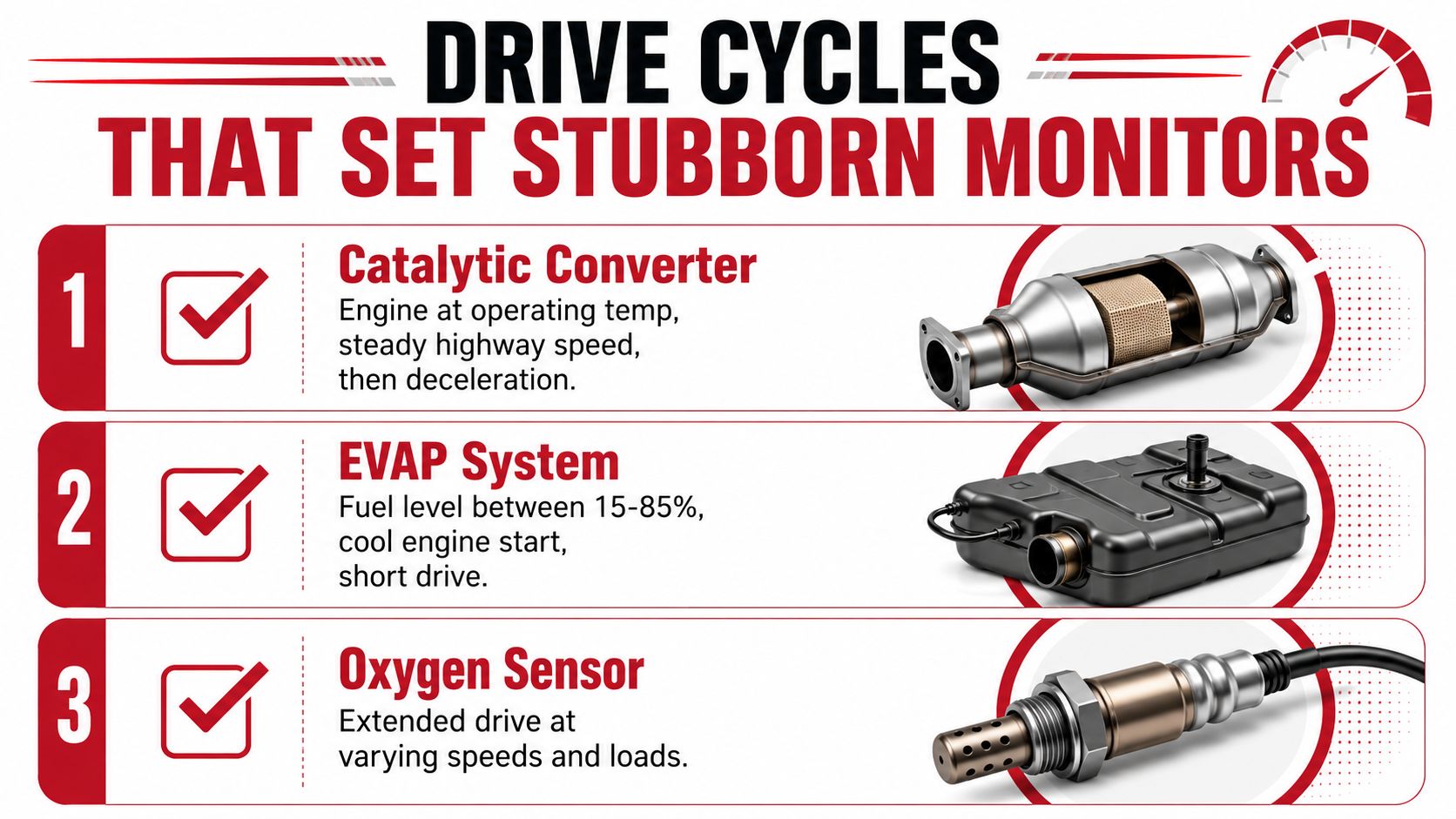
A catalyst or oxygen-sensor test often needs the engine at operating temperature, followed by steady driving and controlled deceleration. Choose a safe route where you can maintain consistent speed without creating a traffic hazard.
Give each monitor the right opportunity
- Catalyst monitor: Use a fully warmed engine, steady open-road driving, and a controlled deceleration when traffic and safety permit. The computer compares sensor behavior while the catalyst is operating under suitable conditions.
- Oxygen-sensor monitor: Include extended driving with changing speeds and engine loads. The system needs enough operating variation to evaluate sensor response.
- EVAP monitor: Keep the fuel level within the vehicle manufacturer's specified range, then allow the car to sit undisturbed after driving if the procedure calls for a leak test. EVAP testing depends heavily on vapor conditions and temperature.
Don't try to force a test by driving recklessly or repeatedly revving the engine. A normal, safe routine is preferable, and some monitors may complete only after the vehicle has been parked and cooled.
Confirm instead of guessing
Drive normally across several separate trips, then check the scanner after each meaningful sequence. If the same monitor remains incomplete, look up the exact procedure for the vehicle's make, model, year, and engine. If a code returns, stop trying to set the monitor and diagnose the underlying issue.
Your Pre-Smog Checklist and When to Visit a STAR Station
Treat readiness as something to verify before the appointment, not something to discover at the inspection bay. Use this checklist after a repair, battery replacement, code clear, or long period of vehicle storage.
- Check the warning light: Make sure the malfunction indicator light isn't illuminated. If it has returned, diagnose the code before scheduling the test.
- Avoid resetting the computer: Don't disconnect the battery or clear codes after the repair unless a technician tells you to do so.
- Check the scanner: Confirm that every applicable monitor reads Ready, not merely that the dashboard light is off.
- Use suitable driving: Mix ordinary city driving with safe open-road operation so the computer can encounter different testing conditions.
- Review fuel conditions: Keep the fuel level within the range recommended for your vehicle's EVAP procedure.
- Scan again before leaving: A final check can show whether a monitor is still incomplete and save you a wasted trip.
A STAR-certified test-only station can make sense when the vehicle has already failed, the registration requires directed testing, or the monitor pattern is difficult to interpret. Fire House Smog is a STAR-certified, test-only station in Antioch that performs smog inspections and can explain the readiness results without selling in-house repair work. You can review what a STAR-certified smog station does before choosing where to test.
Bring the failed test paperwork, repair records, and scanner results if you have them. Those details give the technician a clearer starting point than a simple statement that the car “runs fine.”
Fire House Smog offers STAR-certified test-only smog inspections, readiness-focused guidance, and California DMV registration services at its Antioch location. Check your monitor status before you arrive, then visit Fire House Smog to schedule a test or ask about your vehicle's next step.